
Managed OpenStack
Latest
Frequently Asked Questions
Solution
How To
Internal Only
Templates
Powered By

Title
Message
Create new category
What is the title of your new category?
Edit page index title
What is the title of the page index?
Edit category
What is the new title of your category?
Edit link
What is the new title and URL of your link?
Wrong Gateway IP Specified for External Neutron Network
Copy Markdown
Open in ChatGPT
Open in Claude
Problem
- Floating IPs are unreachable for VMs on a particular external network or subnet.
- VMs with Floating IPs on this subnet are unable to reach the internet or otherwise don't possess any external connectivity.
# ping 8.8.4.4PING 8.8.4.4 (8.8.4.4) 56(84) bytes of data.From 169.254.109.47 icmp_seq=1 Destination Host UnreachableFrom 169.254.109.47 icmp_seq=2 Destination Host Unreachable- The gateway IP is unreachable from the corresponding 'fip-' namespace (residing on the hypervisor for DVR environments, which is default).
$ sudo ip netns exec fip-6655b95d-297f-415e-b4b2-8d2eff2c4d36 ip rule0: from all lookup local32766: from all lookup main32767: from all lookup default2852023599: from all iif fpr-6490dd2d-0 lookup 285202359$ sudo ip netns exec fip-6655b95d-297f-415e-b4b2-8d2eff2c4d36 ip route show table 2852023599default via 146.xx.xxx.xxx dev fg-20345b50-bf$ sudo ip netns exec fip-6655b95d-297f-415e-b4b2-8d2eff2c4d36 ping -c4 146.xx.xxx.xxxPING 146.xx.xxx.xxx (146.xx.xxx.xxx) 56(84) bytes of data.From 146.xx.xxx.xxx icmp_seq=1 Destination Host UnreachableFrom 146.xx.xxx.xxx icmp_seq=2 Destination Host UnreachableFrom 146.xx.xxx.xxx icmp_seq=3 Destination Host UnreachableFrom 146.xx.xxx.xxx icmp_seq=4 Destination Host UnreachableEnvironment
- Platform9 Managed OpenStack - All Versions
- Neutron
Cause
The wrong gateway IP is specified for the Neutron subnet which is associated with the affected VM(s) or networking is misconfigured such that the gateway IP isn't reachable.
Resolution
Clarity UI
- Login to Clarity UI.
- Navigate to > Networks.
- Click on the name of the network.
- Navigate to > Subnets.
- Choose the subnet that needs to be modified.
- Click on "Edit Subnet"
- Edit the "Gateway IP" field.
- Click "Update Subnet".
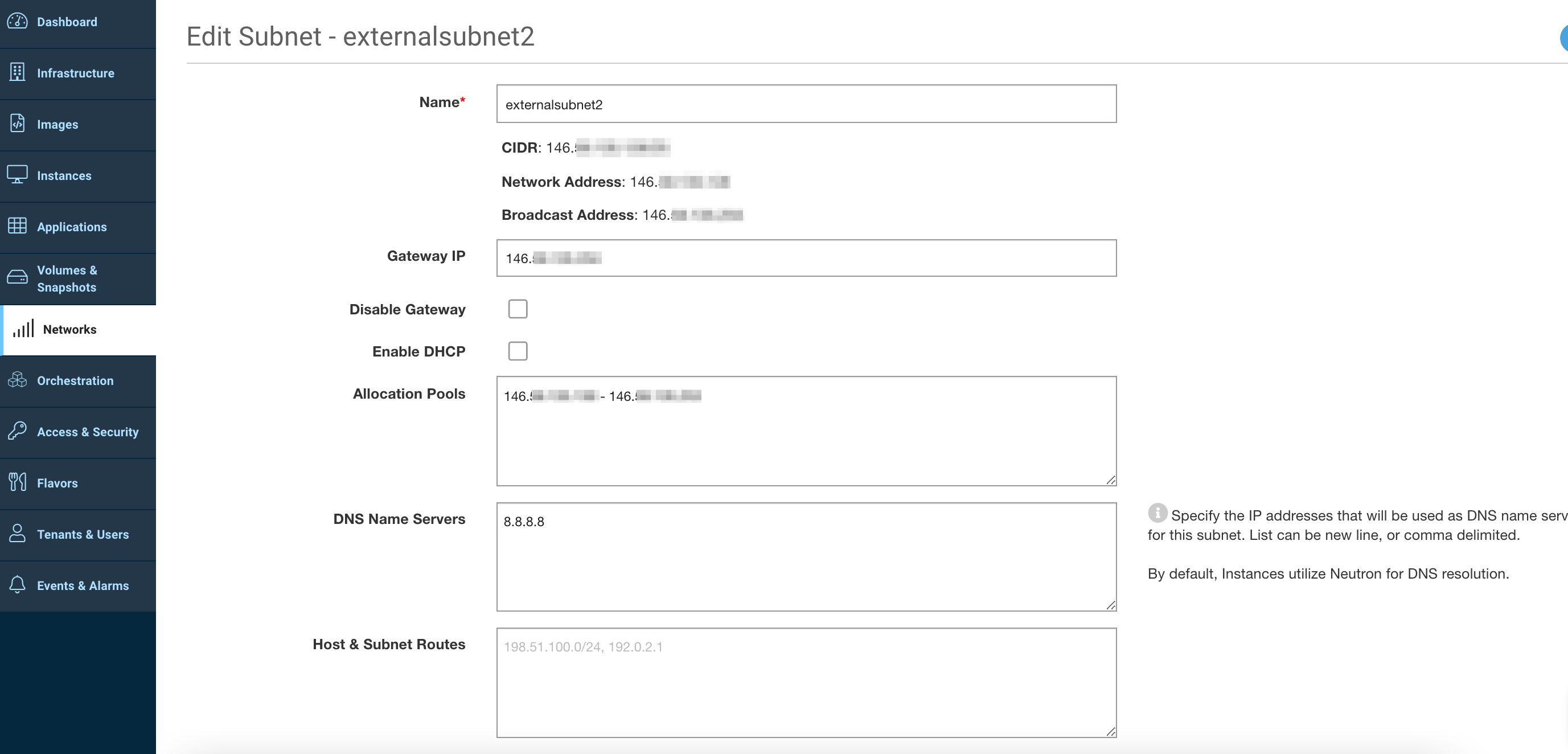
Screen_Shot_2021-04-09_at_9_47_18_AM.png
OpenStack CLI
1. List the networks.
xxxxxxxxxx$ openstack network list2. Show the subnet based on the list of subnet UUIDs returned.
xxxxxxxxxx$ openstack subnet show [UUID]3. Edit the subnet's gateway IP.
xxxxxxxxxx$ openstack subnet set --gateway [IP] [UUID]Additional Information
VariableType to search · ESC to discard
GlossaryType to search · ESC to discard
InsertType to search · ESC to discard
No matches
Last updated on
Was this page helpful?
Discard Changes
Do you want to discard your current changes and overwrite with the template?
Archive Synced Block
Message
Create new Template
What is this template's title?
Delete Template
Message