
Managed OpenStack
Latest
Frequently Asked Questions
Solution
How To
Internal Only
Templates
Powered By

Title
Message
Create new category
What is the title of your new category?
Edit page index title
What is the title of the page index?
Edit category
What is the new title of your category?
Edit link
What is the new title and URL of your link?
Enable Maintenance Mode for Authorized Host
Copy Markdown
Open in ChatGPT
Open in Claude
Problem
Hosts often need to be brought down for maintenance and having instances scheduled to those hosts can disrupt workloads at such times. Hence the option to enable Maintenance Mode on a host.
This option disables the nova-compute service so that no new resources are created on the host.
Environment
- Platform9 Managed OpenStack - All Versions
- Nova
- OpenStack CLI
- Clarity UI
Procedure
- Log in to the Clarity UI as an Admin user.
- Select the Host -> Toggle Maintenance Mode
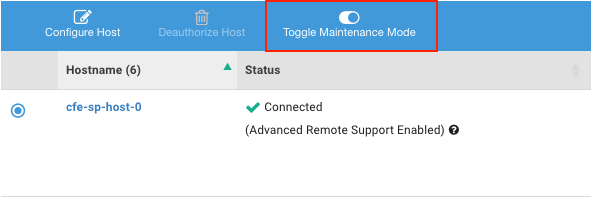
Screen_Shot_2018-10-31_at_1.23.46_PM.png
Note: Enabling Maintenance Mode will prevent additional Instances from being created on the Host. All Instances running on the Host should be removed prior to performing maintenance. If there are instances on the host after enabling maintenance mode those will need to be moved to another host using nova-evacuate.
- Use the OpenStack CLI to verify if the compute service on the host is disabled.
xxxxxxxxxx$ openstack compute service list | grep [host_uuid]Example:
xxxxxxxxxxnova-compute | 394cb179-543e-4e20-979c-b6bf0a6bc4d1 | nova | disabled | up |Additional Information
VariableType to search · ESC to discard
GlossaryType to search · ESC to discard
InsertType to search · ESC to discard
No matches
Last updated on
Was this page helpful?
Discard Changes
Do you want to discard your current changes and overwrite with the template?
Archive Synced Block
Message
Create new Template
What is this template's title?
Delete Template
Message