
Solutions
How Tos
Internal Only
Templates
Powered By

Problem
- How to identify the MajorUpgradeVersion, MinorUpgradeVersion and PatchUpgradeVersion?
- How to find the latest SupportedRoleVersions?
Environment
- Platform9 Managed Kubernetes - All Versions
Answer
- PatchUpgradeVersion - The Last field or Third filed of the version changes. For example: 1.18.10-pmk.1357 --> 1.18.10-pmk.1547. This is Platform9 Patch Upgrade Version. Another example: 1.20.4 --> 1.20.5. This is Kubernetes Patch Upgrade Version.
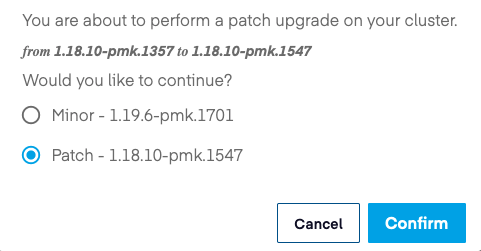
- MinorUpgradeVersion - The Second field of the version changes. For example: 1.18.10-pmk.1357 --> 1.19.6-pmk.1701. Here the minor upgrade is because v1.18 --> v1.19
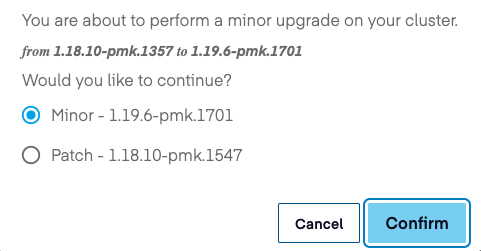
During a Minor version upgrade, it always selects the latest patch version available. For example, The current Kubernetes Version is 1.19.6-pmk.1625 and a minor version upgrade takes to the latest available 1.20 version which is 1.20.5-pmk.1894 ( 1.19.6-pmk.1625 --> 1.20.5-pmk.1894)
- MajorUpgradeVersion - The First field of the version change. For example: v1.20 --> v2.1
Platform Managed Kubernetes(PMK) has Multi-Version Support from v5.0 so can select either patch or minor upgrade based on requirement or preference.
- All the supported version can also be found using the following Qbert API call:
# curl -s https://<DU_FQDN>/qbert/v4/<project_ID>/clusters/supportedRoleVersions -H "X-Auth-Token: $OS_TOKEN" | jq | grep roleVersion "roleVersion": "1.17.9-pmk.1467", "roleVersion": "1.18.10-pmk.1547", "roleVersion": "1.19.6-pmk.1625", "roleVersion": "1.20.5-pmk.1865",The token can be generated by following steps mentioned in Keystone Identity.
Was this page helpful?