
Frequently Asked Questions
How Tos
Internal Only
Templates
Powered By

Problem
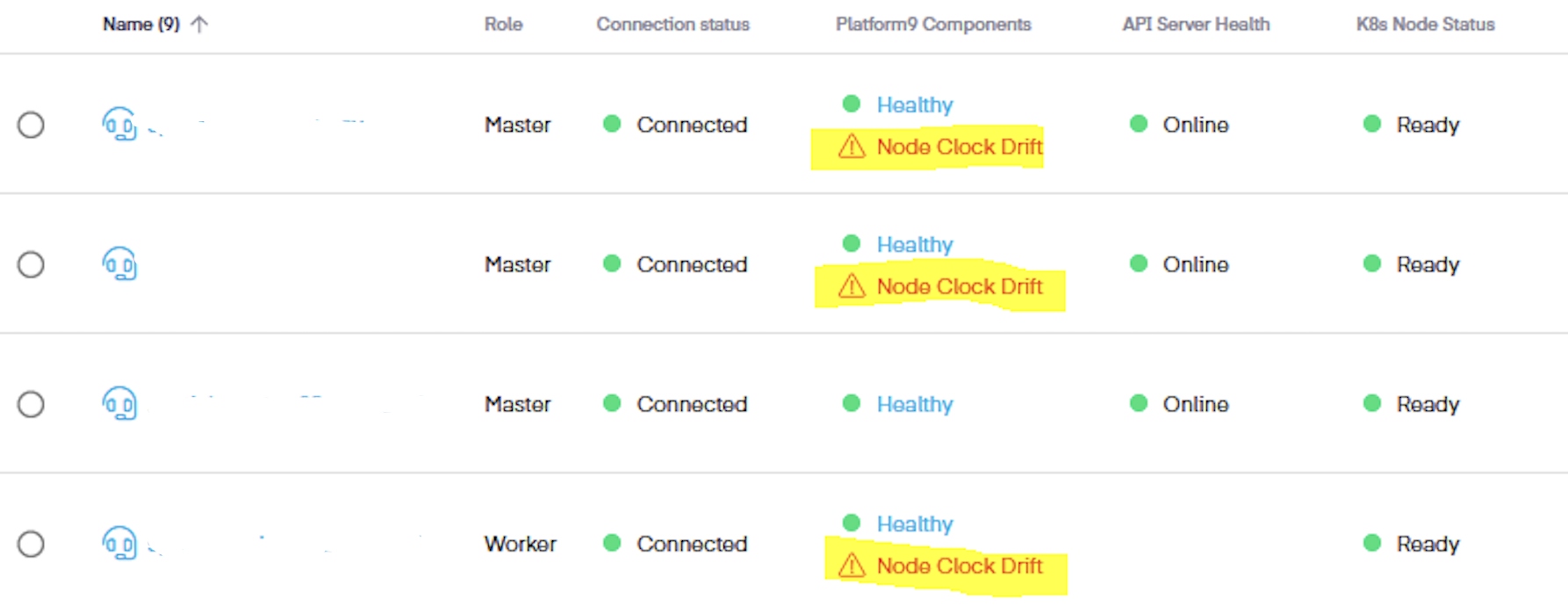
The node clock drift issue is caused due to management plane clock and node clock is not in sync with each other. Usually, this is observed through GUI as shown below:
Environment
- Platform9 Managed Kubernetes - v5.4.0 and Higher
Scenario for the customer using local time and neither NTPD nor Chronyd. The hardware and system software clock was not synced. The hardware clock is synced with a global clock, but the timedatectl is set to use local RTC.
Procedure
Here we are going to sync the hardware clock to the system clock
- Check the warning by running the "timedatectl" command. Use RTC in UTC by running the below command - as the system is configured to read RTC time in local time.
xxxxxxxxxx#timedatectl set-local-rtc 02. Check the timedatectl, hwclock, and system clock, then sync the hardware clock to the system clock by running:
xxxxxxxxxx# timedatectl Local time: Wed 2022-11-23 10:04:53 UTC Universal time: Wed 2022-11-23 10:04:53 UTC RTC time: Wed 2022-11-23 09:59:46 Time zone: UTC (UTC, +0000) NTP enabled: yesNTP synchronized: no RTC in local TZ: no DST active: n/a # hwclock ; dateWed 23 Nov 2022 09:55:30 AM UTC -0.860011 secondsWed Nov 23 10:00:36 UTC 2022 #hwclock --hctosys3. Verify hwclock, system clock, and timedatectl - it should be in sync now.
xxxxxxxxxx# hwclock ; dateWed 23 Nov 2022 10:00:50 AM UTC -0.631062 secondsWed Nov 23 10:00:50 UTC 2022 #timedatectl Local time: Wed 2022-11-23 10:00:55 UTC Universal time: Wed 2022-11-23 10:00:55 UTC RTC time: Wed 2022-11-23 10:00:55 Time zone: UTC (UTC, +0000) NTP enabled: yesNTP synchronized: no RTC in local TZ: no DST active: n/aWas this page helpful?